
Intro
Internal linking is the one ranking factor you control completely. No outreach, no waiting on anyone else, no budget. You decide which pages link to which.
Which makes it strange that almost nobody audits it.
The reason is practical. Auditing internal links by hand means opening every page on your site and recording every link sitting inside the body content. On a fifty-page site that’s a day’s work. On a two-hundred-page site, nobody is doing it.
So it goes unchecked for years. Pages get published and never linked to. The same page collects four different anchor texts. A single paragraph ends up carrying three links. None of it shows up in a report — you find out when rankings drift, and by then you’re guessing at the cause.
This guide covers what to look for, why each issue matters, and a prompt that runs the whole audit for you.
The Four Problems an Internal Link Audit Finds
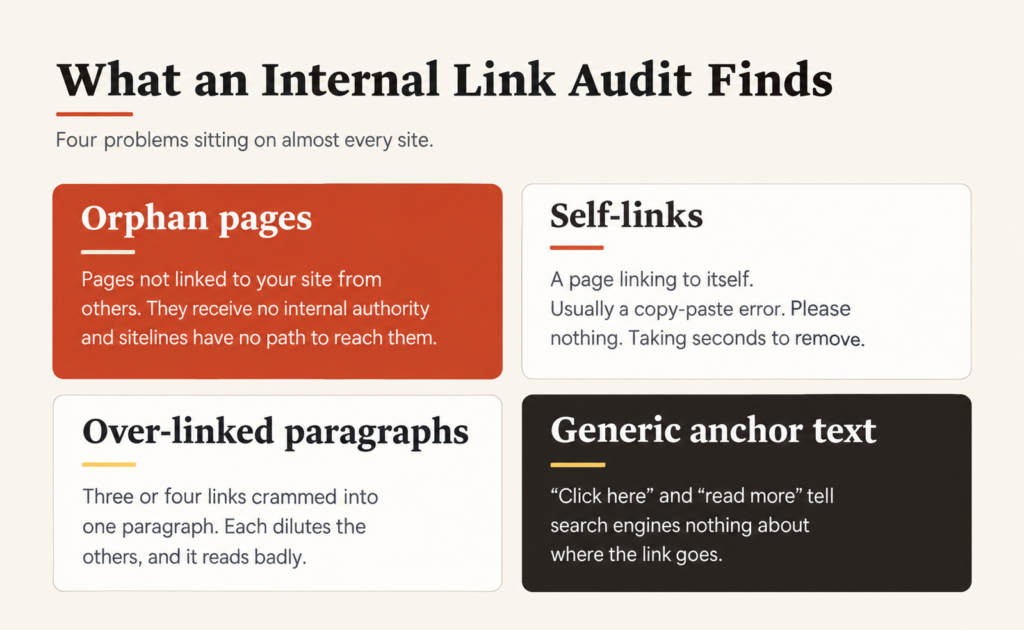
Orphan pages
A page nothing on your site links to. Search engines can still find it through your sitemap, but it receives no internal authority from the rest of your site, and visitors have no path to it.
These are almost always pages you forgot you published — an old blog post, a service page from a launch, a case study nobody linked back to. On most sites they sit there for years earning nothing.
Self-links
A page linking to itself. Usually a copy-paste accident or a template error. It passes nothing, confuses nobody except crawlers, and takes seconds to remove. There’s no argument for keeping one.
Over-linked paragraphs
Two, three or four internal links crammed into a single paragraph. Each link dilutes the others, and it reads badly. One link per paragraph, placed where it genuinely helps the reader, outperforms three fighting for attention.
Inconsistent or generic anchor text
If five pages link to your SEO service page using five different anchors, search engines get a muddled signal about what that page is for. And if the anchor is “click here” or “read more”, you’ve spent a link telling search engines nothing at all.
Consistency matters more than perfection here — pick the phrase that describes the destination and use it.
Why Body Links Are the Only Ones That Count
This is the part most people get wrong when they try to audit manually.
Your navigation menu links to every main page. So does your footer. Those links exist on every page of your site, which means they carry very little weight individually — search engines discount site-wide template links precisely because they’re everywhere.
What matters is links inside your actual content: paragraphs, headings, lists. A link from the body of a relevant blog post carries genuine signal. The same link in your footer barely registers.
So when auditing, ignore the nav, the footer, the sidebar and any related-posts widget. Count only what’s written into the content. That’s the number that reflects your real internal linking.
The Audit Prompt
Paste this into Claude or any AI assistant with web access, then send your homepage URL and sitemap URL as the next message.
ROLE You are running an internal link audit on my website. Report only what exists — do not suggest rewrites or add links. I’ll decide what to fix once I can see the picture.
Run every step without stopping to ask me questions. If the site exceeds 200 pages, tell me it will take longer and continue anyway.
EXCLUDE THESE FROM THE AUDIT Do not treat these as content pages: Contact, About, Privacy Policy, Terms, Cookie Policy, Disclaimer, Refund Policy, Sitemap, Search, 404, Login, Register, My Account, Cart, Checkout, Thank You. Tell me how many you excluded.
STEP 1 — MAP THE SITE Fetch my sitemap, follow any child sitemaps, and build the complete URL list.
STEP 2 — EXTRACT BODY LINKS ONLY
For each URL, fetch the live page and extract every internal link inside the written content — paragraphs, headings, blockquotes, list items and content tables.
Ignore: navigation, headers, footers, sidebars, related-post widgets, pricing and product blocks, image-only links, video embeds, external links, same-page anchor links, and buttons outside paragraphs.
Convert every link to its absolute URL. Treat /page and /page/ as the same destination.
STEP 3 — FLAG PER-PAGE ISSUES For each page, give me a table of anchor text, destination URL, and any flag:
- Self-link (page linking to itself)
- Second link within one paragraph (list items excepted)
- Third or more links within one paragraph
If a page has no body links at all, state that plainly.
STEP 4 — BUILD THREE SITE-WIDE REPORTS
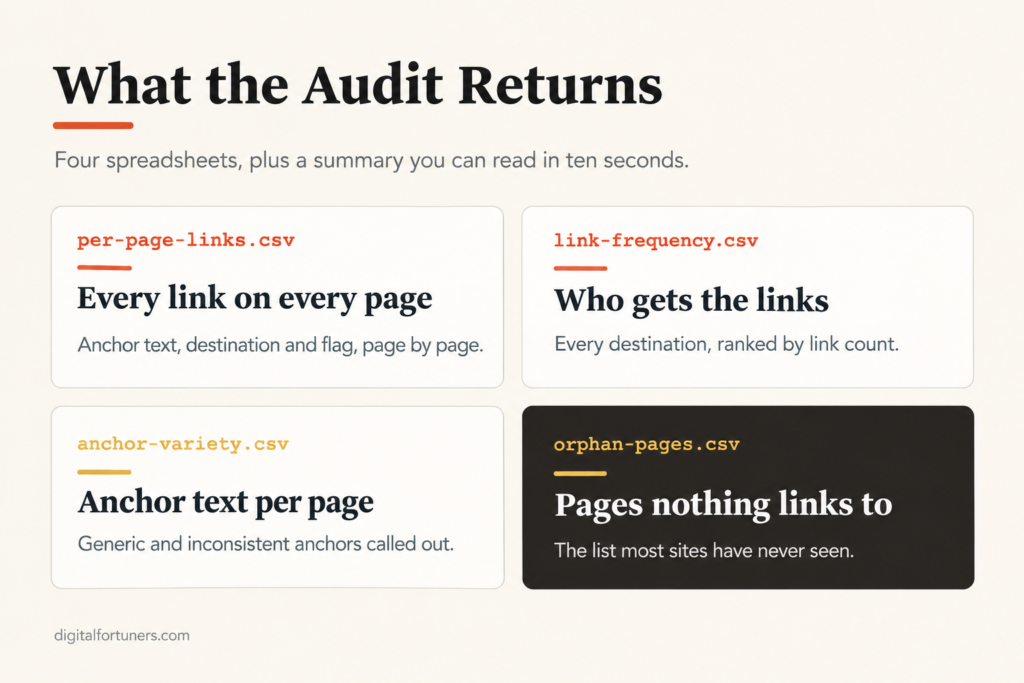
- Link frequency — every destination URL, how many times it’s linked, and from which pages, sorted highest to lowest
- Anchor text variety — for any page linked twice or more, list every anchor used. Flag where three or more different anchors point at one page, or where an anchor is generic (“click here”, “read more”, “this page”)
- Orphan pages — content pages nothing else on the site links to
STEP 5 — EXPORT Give me four CSVs: per-page-links.csv, link-frequency.csv, anchor-variety.csv, orphan-pages.csv
STEP 6 — PLAIN SUMMARY Pages audited. Pages with body links vs pages with none. Total body links. Self-links found. Over-linked paragraphs. Most-linked page. Pages receiving only one link. Anchor inconsistencies. Generic anchors. Orphan pages.
NOTE If my site runs on React, Next.js, Vue or another JavaScript framework, some content may not load before the fetch completes. Tell me if you notice this, so I know the counts may be undercounted.
I’ll send my homepage URL and sitemap URL next.
What to Fix First
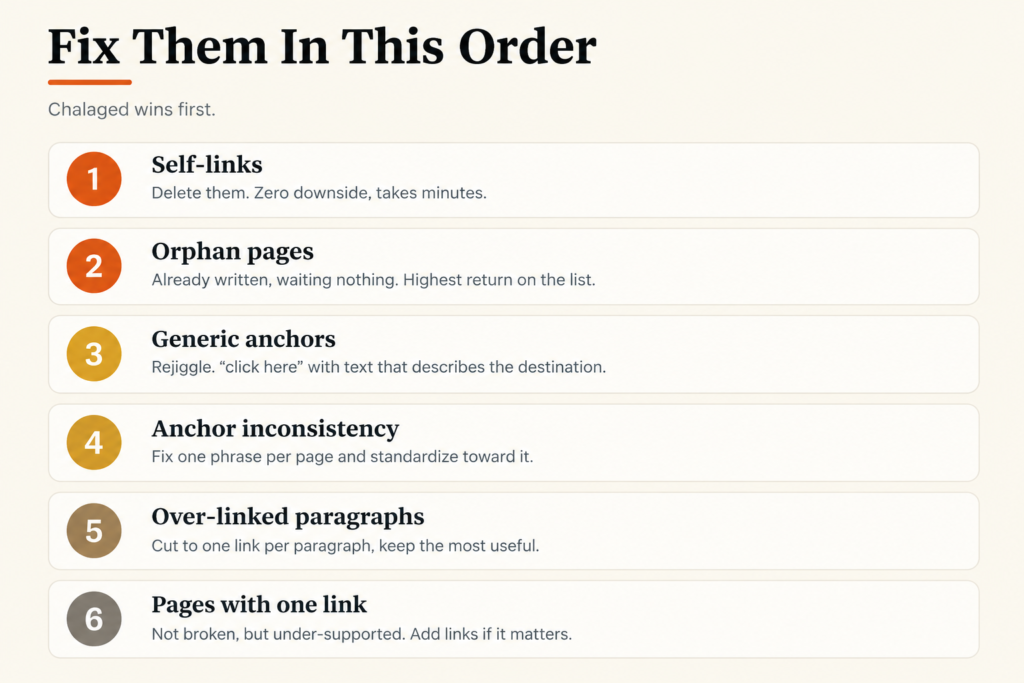
The audit gives you a lot at once. Work through it in this order — cheapest wins first.
Self-links. Delete them. Zero downside, takes minutes.
Orphan pages. Every orphan is a page already written and already published, earning nothing. Linking to it from two or three relevant pages costs nothing and starts it working immediately. This is usually the highest-return fix on the list.
Generic anchors. Replace “click here” and “read more” with text that describes the destination. Each one is a wasted signal you’ve already paid for.
Anchor inconsistency. For any page collecting several different anchors, choose the phrase that best describes it and standardise toward it over time. You don’t need to fix every instance at once.
Over-linked paragraphs. Cut to one link per paragraph, keeping whichever is most useful to the reader.
Pages with only one link. Not broken, but under-supported. If a page matters commercially, it deserves more than a single internal link pointing at it.
What Good Internal Linking Looks Like
Once the problems are cleared, the structure underneath should be intentional rather than accidental.
Your homepage links down to your main hub pages. Your services hub links to each individual service page. Each service page links sideways to the two or three services most closely related to it — SEO to local SEO , Meta Ads to website design, content marketing to all of them, because content feeds everything.
And every blog post links back to whichever service pages it genuinely relates to. A post about local search should point at your local SEO page, not a generic list of every service you offer.
The rule underneath all of it: link where a reader would actually want to click next. Links added for search engines that don’t serve the reader tend to be the ones that get ignored by both.
Run It Quarterly
Internal linking degrades quietly. Every post you publish is a potential orphan. Every new page is a chance to add a link nobody thought to add.
Once a quarter is enough to catch drift before it matters. And unlike most SEO work, this compounds — a site with deliberate internal linking gets more out of every page it publishes afterwards.